
Vue-router路由模式、守卫、解析流程
2024-08-19
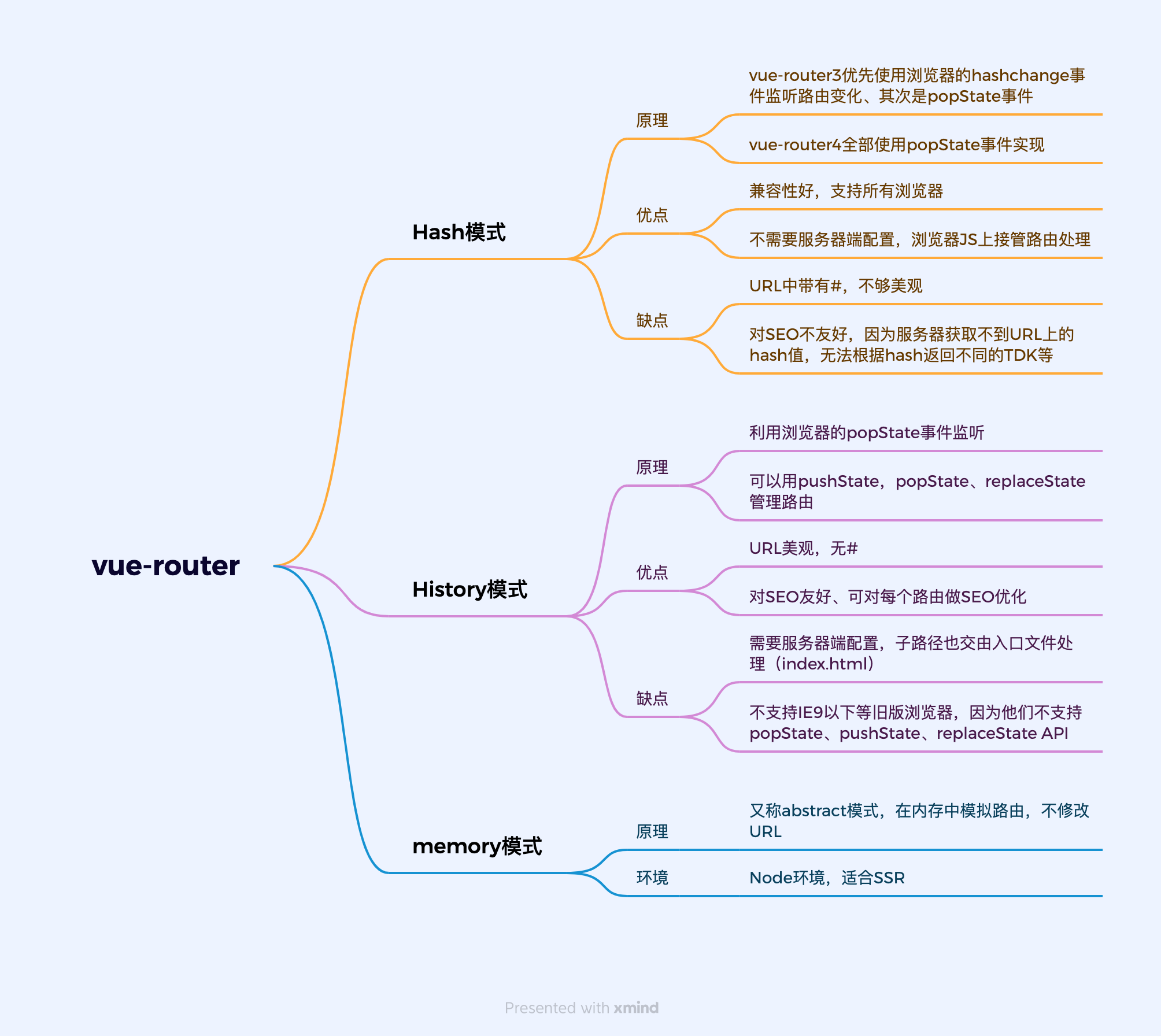
一、路由模式:
二、路由守卫
1.全局
- 全局前置守卫:router.beforeEach
- 全局解析守卫:router.beforeResolve
- 全局后置守卫:router.afterEach
2.独享守卫
js
const routes = [
  {
    path: '/users/:id',
    component: UserDetails,
    beforeEnter: [removeQueryParams, removeHash],
  },
  {
    path: '/about',
    component: UserDetails,
    beforeEnter: [removeQueryParams],
  },
]
3.组件内守卫
js
const UserDetails = {
  template: `...`,
  beforeRouteEnter(to, from) {
    // 在渲染该组件的对应路由被验证前调用
    // 不能获取组件实例 `this` !
    // 因为当守卫执行时,组件实例还没被创建!
  },
  beforeRouteUpdate(to, from) {
    // 在当前路由改变,但是该组件被复用时调用
    // 举例来说,对于一个带有动态参数的路径 `/users/:id`,在 `/users/1` 和 `/users/2` 之间跳转的时候,
    // 由于会渲染同样的 `UserDetails` 组件,因此组件实例会被复用。而这个钩子就会在这个情况下被调用。
    // 因为在这种情况发生的时候,组件已经挂载好了,导航守卫可以访问组件实例 `this`
  },
  beforeRouteLeave(to, from) {
    // 在导航离开渲染该组件的对应路由时调用
    // 与 `beforeRouteUpdate` 一样,它可以访问组件实例 `this`
  },
}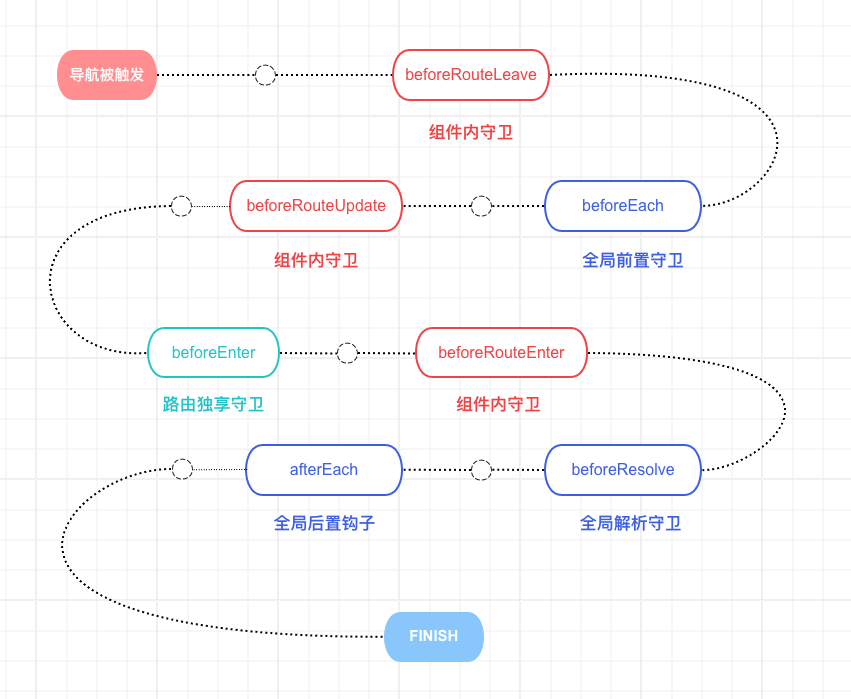
三、完整的导航解析流程
- 导航被触发。
- 在失活的组件里调用
beforeRouteLeave守卫。 - 调用全局的
beforeEach守卫。 - 在重用的组件里调用
beforeRouteUpdate守卫(2.2+)。 - 在路由配置里调用
beforeEnter。 - 解析异步路由组件。
- 在被激活的组件里调用
beforeRouteEnter。 - 调用全局的
beforeResolve守卫(2.5+)。 - 导航被确认。
- 调用全局的
afterEach钩子。 - 触发 DOM 更新。
- 调用
beforeRouteEnter守卫中传给next的回调函数,创建好的组件实例会作为回调函数的参数传入。
参考
github参考地址:https://github.com/vuejs/vue-router/blob/dev/src/index.js
Vue-router3.x官方文档:https://v3.router.vuejs.org/zh/